About Cut Paste Photo AI
Photo Cut Paste is a NextGen Cut Paste Photo Editor app by which you can cut out any part of image automatically with Auto Selection tool and paste it on another image or background. Try Now for Free! Auto Photo Cut Paste...
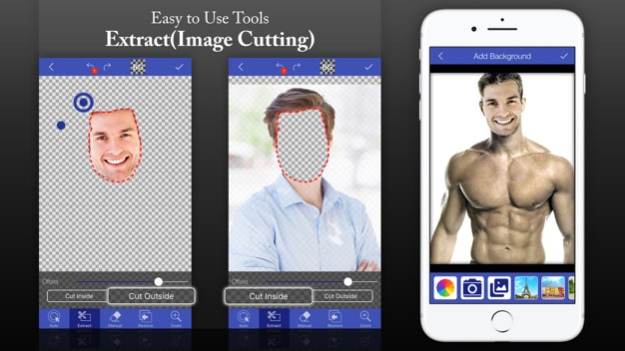
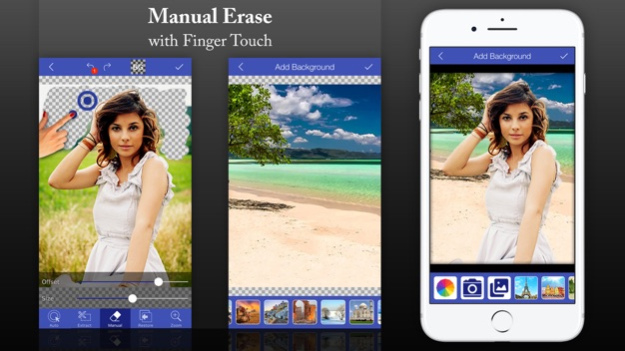
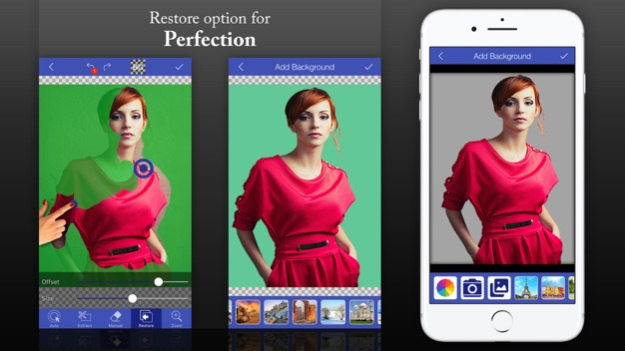
Photo Cut Paste is a NextGen Cut Paste Photo Editor app by which you can cut out any part of image automatically with Auto Selection tool and paste it on another image or background. Try Now for Free! Auto Photo Cut Paste provides a fast and easy way to create amazing custom pictures. You don`t need Photoshop. Just touch the area of picture which you want to erase and Auto Cut Paste will automatically detect the entire area through color detection AI and it will erase that area for you so that you can paste the cutout image on any other picture or on our existing HD backgrounds. You can also erase your photos background manually by finger touch or with Lasso (Image Cutting) tool. Remove background from your photos & save the transparent image in PNG or JPG format! The resulting images can be used as stamps with other apps to make a photo-montage, collage or with beautiful Background (Use Our Backgrounds or Yours). Key Features: ***** Auto Erase - One Touch Background Removal with Color Touch AI ***** Manual Erase - Finger Rub Background Removal ***** Extract Cut Photos (Cut Photos In OR Cut Photos Out) - Area Selection Background Removal ***** Restore - Finger Rub Background Retrieval ***** Undo, Redo & Zoom - For accurate result ***** Save & Share - Save on SD-Card & Share on Social Media The best utility to cut photos and change photo background. TRY NOW!! **** This App allows you to purchase subscriptions . Weekly Or Yearly Subscription - allows you to enjoy the app without Ads and get all features unlocked with access to all Template Categories . Length of subscription (You can opt for per week Or per year) . Payment will be charged to iTunes Account at confirmation of purchase . Subscription automatically renews unless auto-renew is turned off at least 24-hours before the end of the current period . Account will be charged for renewal within 24-hours prior to the end of the current period, and identify the cost of the renewal . Subscriptions may be managed by the user and auto-renewal may be turned off by going to the user's Account Settings after purchase . Any unused portion of a free trial period, if offered, will be forfeited when the user purchases a subscription to that publication, where applicable - Terms of use Details can be found at http://www.simplyentertaining.us/terms-and-conditions.html - Privacy Policy : http://www.simplyentertaining.us/privacypolicy.html
Version History What’s New Optimized Workflow: Faster and more intuitive cut-and-edit process. Bug Fixes: Resolved minor glitches to provide a more reliable app. Performance Enhancements: Improved speed and stability for all devices. Refined Experience: A cleaner and more polished interface for your projects. 4.2.1 Mar 3 - Introducing AI Tools Like Try On Hairs, Try On Dress, Image Blend, Background Change Etc - Introducing AI Generated Presets 4.0 Jan 5 Say hello to the Magic Tool – your new one-tap way to erase backgrounds smarter and faster! -Magic Tool Just tap a color, press apply and boom — it’s gone! Perfect for removing solid color areas with one touch. -AI + Magic = Faster Edits Combine Magic Tool with AI Auto BG Remove for pro-level precision in seconds. -Even More Control Switch between tools effortlessly: Magic, Manual, Lasso, Erase, Restore — all powered up for your creativity. -Performance Boosts Optimized memory, faster rendering, and better handling of large images. -Bug Fixes & Improvements We fixed crashes and polished the overall experience for smoother editing. 3.1 11/01/2025 Smarter Auto Cut (AI Powered) Our Auto Cut tool just got a brain upgrade! Enjoy cleaner, faster cutouts with improved AI precision. All-New Design + Smooth Animations Fresh look, smoother transitions. A cleaner interface that feels as good as it looks. Major Performance Boost Under-the-hood optimizations for faster edits, quicker exports, and buttery-smooth experience — especially on high-res images. Bug Fixes & Crash Resolutions Squashed bugs and fixed crashes to keep things running smoothly. Advanced Editor Tools Unlocked Now add backgrounds, stickers, and custom text — right from the editor. Your creativity, fully unleashed. 3.0 09/23/2025 Enhanced Auto Cut Paste Functionality. Fixed Bugs. 2.0 06/07/2017 - Improved Performance of Auto Cutting - Fixed Bugs 1.1 02/08/2017 1.0 01/31/2017
Previous Versions
Here you can find the changelog of Cut Paste Photo AI since it was posted on our website on 2021-12-13 20:30:22.
The latest version is 4.2.1 and it was updated on 2026-10-14 03:45:53. See below the changes in each version.
Cut Paste Photo AI version 4.2.1
Updated At: 2026-10-14
Changes: Version History What’s New
Optimized Workflow: Faster and more intuitive cut-and-edit process.
Bug Fixes: Resolved minor glitches to provide a more reliable app.
Performance Enhancements: Improved speed and stability for all devices.
Refined Experience: A cleaner and more polished interface for your projects. 4.2.1 Mar 3 - Introducing AI Tools Like Try On Hairs, Try On Dress, Image Blend, Background Change Etc
- Introducing AI Generated Presets 4.0 Jan 5 Say hello to the Magic Tool – your new one-tap way to erase backgrounds smarter and faster!
-Magic Tool
Just tap a color, press apply and boom — it’s gone! Perfect for removing solid color areas with one touch.
-AI + Magic = Faster Edits
Combine Magic Tool with AI Auto BG Remove for pro-level precision in seconds.
-Even More Control
Switch between tools effortlessly: Magic, Manual, Lasso, Erase, Restore — all powered up for your creativity.
-Performance Boosts
Optimized memory, faster rendering, and better handling of large images.
-Bug Fixes & Improvements
We fixed crashes and polished the overall experience for smoother editing. 3.1 11/01/2025 Smarter Auto Cut (AI Powered)
Our Auto Cut tool just got a brain upgrade! Enjoy cleaner, faster cutouts with improved AI precision.
All-New Design + Smooth Animations
Fresh look, smoother transitions. A cleaner interface that feels as good as it looks.
Major Performance Boost
Under-the-hood optimizations for faster edits, quicker exports, and buttery-smooth experience — especially on high-res images.
Bug Fixes & Crash Resolutions
Squashed bugs and fixed crashes to keep things running smoothly.
Advanced Editor Tools Unlocked
Now add backgrounds, stickers, and custom text — right from the editor. Your creativity, fully unleashed. 3.0 09/23/2025 Enhanced Auto Cut Paste Functionality.
Fixed Bugs. 2.0 06/07/2017 - Improved Performance of Auto Cutting
- Fixed Bugs 1.1 02/08/2017 1.0 01/31/2017
Cut Paste Photo AI version 4.2.1
Updated At: 2026-09-04
Changes: Version History What’s New
Optimized Workflow: Faster and more intuitive cut-and-edit process.
Bug Fixes: Resolved minor glitches to provide a more reliable app.
Performance Enhancements: Improved speed and stability for all devices.
Refined Experience: A cleaner and more polished interface for your projects. 4.2.1 Mar 3 - Introducing AI Tools Like Try On Hairs, Try On Dress, Image Blend, Background Change Etc
- Introducing AI Generated Presets 4.0 Jan 5 Say hello to the Magic Tool – your new one-tap way to erase backgrounds smarter and faster!
-Magic Tool
Just tap a color, press apply and boom — it’s gone! Perfect for removing solid color areas with one touch.
-AI + Magic = Faster Edits
Combine Magic Tool with AI Auto BG Remove for pro-level precision in seconds.
-Even More Control
Switch between tools effortlessly: Magic, Manual, Lasso, Erase, Restore — all powered up for your creativity.
-Performance Boosts
Optimized memory, faster rendering, and better handling of large images.
-Bug Fixes & Improvements
We fixed crashes and polished the overall experience for smoother editing. 3.1 11/01/2025 Smarter Auto Cut (AI Powered)
Our Auto Cut tool just got a brain upgrade! Enjoy cleaner, faster cutouts with improved AI precision.
All-New Design + Smooth Animations
Fresh look, smoother transitions. A cleaner interface that feels as good as it looks.
Major Performance Boost
Under-the-hood optimizations for faster edits, quicker exports, and buttery-smooth experience — especially on high-res images.
Bug Fixes & Crash Resolutions
Squashed bugs and fixed crashes to keep things running smoothly.
Advanced Editor Tools Unlocked
Now add backgrounds, stickers, and custom text — right from the editor. Your creativity, fully unleashed. 3.0 09/23/2025 This app has been updated by Apple to prepare for watchOS 27 compatibility. No new features are included.
Enhanced Auto Cut Paste Functionality.
Fixed Bugs. 2.0 06/07/2017 - Improved Performance of Auto Cutting
- Fixed Bugs 1.1 02/08/2017 1.0 01/31/2017
Cut Paste Photo AI version 4.2.1
Updated At: 2026-08-22
Changes: Version History What’s New
Optimized Workflow: Faster and more intuitive cut-and-edit process.
Bug Fixes: Resolved minor glitches to provide a more reliable app.
Performance Enhancements: Improved speed and stability for all devices.
Refined Experience: A cleaner and more polished interface for your projects. 4.2.1 Mar 3 - Introducing AI Tools Like Try On Hairs, Try On Dress, Image Blend, Background Change Etc
- Introducing AI Generated Presets 4.0 Jan 5 Say hello to the Magic Tool – your new one-tap way to erase backgrounds smarter and faster!
-Magic Tool
Just tap a color, press apply and boom — it’s gone! Perfect for removing solid color areas with one touch.
-AI + Magic = Faster Edits
Combine Magic Tool with AI Auto BG Remove for pro-level precision in seconds.
-Even More Control
Switch between tools effortlessly: Magic, Manual, Lasso, Erase, Restore — all powered up for your creativity.
-Performance Boosts
Optimized memory, faster rendering, and better handling of large images.
-Bug Fixes & Improvements
We fixed crashes and polished the overall experience for smoother editing. 3.1 11/01/2025 Smarter Auto Cut (AI Powered)
Our Auto Cut tool just got a brain upgrade! Enjoy cleaner, faster cutouts with improved AI precision.
All-New Design + Smooth Animations
Fresh look, smoother transitions. A cleaner interface that feels as good as it looks.
Major Performance Boost
Under-the-hood optimizations for faster edits, quicker exports, and buttery-smooth experience — especially on high-res images.
Bug Fixes & Crash Resolutions
Squashed bugs and fixed crashes to keep things running smoothly.
Advanced Editor Tools Unlocked
Now add backgrounds, stickers, and custom text — right from the editor. Your creativity, fully unleashed. 3.0 09/23/2025 This update from Apple will improve the functionality of this app. No new features are included.
Enhanced Auto Cut Paste Functionality.
Fixed Bugs. 2.0 06/07/2017 - Improved Performance of Auto Cutting
- Fixed Bugs 1.1 02/08/2017 1.0 01/31/2017
Cut Paste Photo AI version 4.2.1
Updated At: 2026-03-03
Changes: What’s New
Optimized Workflow: Faster and more intuitive cut-and-edit process.
Bug Fixes: Resolved minor glitches to provide a more reliable app.
Performance Enhancements: Improved speed and stability for all devices.
Refined Experience: A cleaner and more polished interface for your projects.
Cut Paste Photo AI version 4.0
Updated At: 2026-01-05
Changes: - Introducing AI Tools Like Try On Hairs, Try On Dress, Image Blend, Background Change Etc
- Introducing AI Generated Presets
Cut Paste Photo AI version 3.0
Updated At: 2025-09-23
Changes: Sep 23, 2025
Version 3.0
Smarter Auto Cut (AI Powered)
Our Auto Cut tool just got a brain upgrade! Enjoy cleaner, faster cutouts with improved AI precision.
All-New Design + Smooth Animations
Fresh look, smoother transitions. A cleaner interface that feels as good as it looks.
Major Performance Boost
Under-the-hood optimizations for faster edits, quicker exports, and buttery-smooth experience — especially on high-res images.
Bug Fixes & Crash Resolutions
Squashed bugs and fixed crashes to keep things running smoothly.
Advanced Editor Tools Unlocked
Now add backgrounds, stickers, and custom text — right from the editor. Your creativity, fully unleashed.
Cut Paste Photo AI version 2.0
Updated At: 2017-06-07
Changes: Jun 7, 2017 Version 2.0
This app has been updated by Apple to display the Apple Watch app icon.
Enhanced Auto Cut Paste Functionality.
Fixed Bugs.
Disclaimer
Official App Store Link
We do not host Cut Paste Photo AI on our servers. We did not scan it for viruses, adware, spyware or other type of malware. This app is hosted by Apple and passed their terms and conditions to be listed there. We recommend caution when installing it.
The App Store link for Cut Paste Photo AI is provided to you by apps112.com without any warranties, representations or guarantees of any kind, so access it at your own risk.
If you have questions regarding this particular app contact the publisher directly. For questions about the functionalities of apps112.com contact us.